If you wish to add users or change passwords in Active
Directory from Java code, you will need to install an SSL certificate generated by your
Active Directory server and then install the certificate into your JVM
keystore.
The very first step to enable secure communication between Java and Active Directory is:
Installation of the Active Directory Certificate Services
This installs a certification authority (CA) which is used to issue certificates. Description below, explains this process. The screenshots below are scrapped from Server 2008R2 Polish language version, but visually English interface appears very simillar.
1. Log in to your Active Directory server as an administrator.
2. Click
Start, point to
Administrative Tools, and then click
Server Manager.
3. In the
Roles Summary section, click
Add Roles.
4. On the
Select Server Roles page, select the
Active Directory Certificate Services check box. Click
Next.
5. The Certification Authority instalation wizard appears. Click
Next.
6. On the
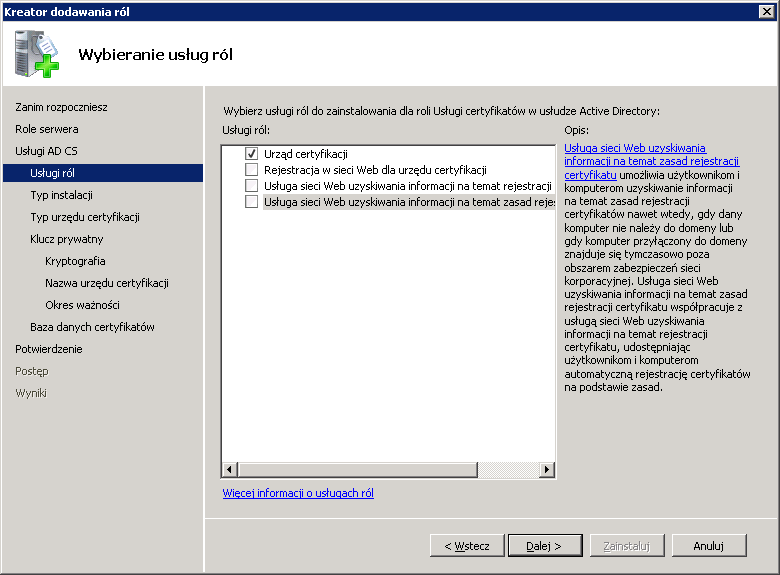
Select Role Services page, select the
Certification Authority check box, and then click
Next.
7. On the
Specify Setup Type page, click
Enterprise, and then click
Next.
8. On the
Specify CA Type page, click
Root Certification Authority, and then click
Next.
9. On the
Set Up Private Key select
Create new private key. Then click
Next.
10. On the
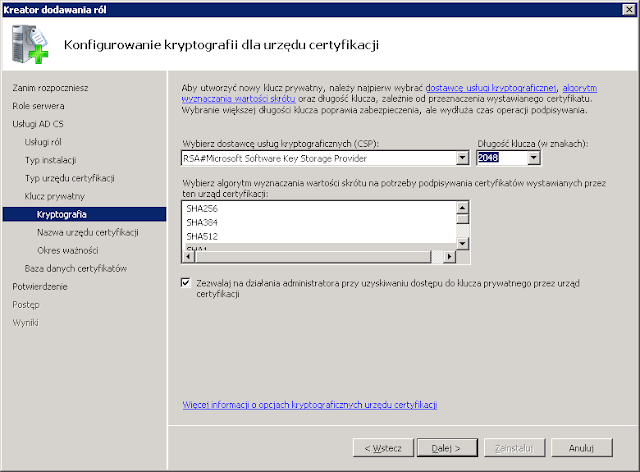
Configure Cryptography for CA you can select default values which should be ok in typical cases.
11. In the
Common name for this CA box, type the common name of the CA, and then click
Next.
12. On the
Set Validity Period page, accept the default
values, and then click
Next.
13. On the
Configure Certification Database page you can change default database and log location if you really need. Then click
Next.
14. On the
Confirm Installation Selections page you have selected settings summary. If all is ok, click
Install.
15. Review the information on the results screen to verify that the installation was successful.
16. Restart the server.
Obtaining the Server Certificate
After installation of CA you need obtain Microsoft Active Directory server's SSL certificate to add it to the list of accepted certificates used by the JDK that runs your application or application server.
To export certificate you should run from command line:
certutil -ca.cert your_server_certificate.crt
Obtained file will be ready to import into JDK keystore.
Importing the Server Certificate
For an Java application to trust your Active Directory's certificate, it must be imported into your Java runtime environment default keystore. The JDK stores trusted certificates in a file called a
jre\lib\security\cacerts in the root directory of your Java Development Kit installation.
To import certificate go to
jre\bin directory and run:
keytool -import -keystore ..\lib\security\cacerts -alias yourAlias -file c:\your_path\
your_server_certificate.crt
The
keytool will prompt you for a password. The default keystore password is changeit.
Reslut of above operation is shown bellow:
When prompted
Trust this certificate? [no]: enter
yes to confirm the key import.
Next you can try connect to Active Directory drirectly from your Java application.